What is a User Journey Map? 2026 UX Guide & Design Examples
What is a user journey map? Discover the 2026 UX guide to mapping interactions and emotions. Get expert journey map examples for mobile apps and web. Read now!
Table of Contents
Many early‑stage teams are obsessed with shipping features. In the hustle to build, it’s easy to miss what matters most: how people actually experience your product. Every step a user takes – whether they are signing up for a trial or trying to fix an issue – tells you something about why they stay or leave. Mapping these steps uncovers patterns you might otherwise ignore. It’s not a marketing exercise; it’s about building empathy and seeing your product the way your audience does.
In this article I’ll break down what is a user journey map and how it can help founders, product managers and design leaders deliver better outcomes.
A quick promise: you’ll gain a clear understanding of the concept, learn the terminology, and see how mapping connects to real business goals. I’ll also show you a step‑by‑step process for building maps that guide decisions rather than gathering dust.
What is a user journey map?
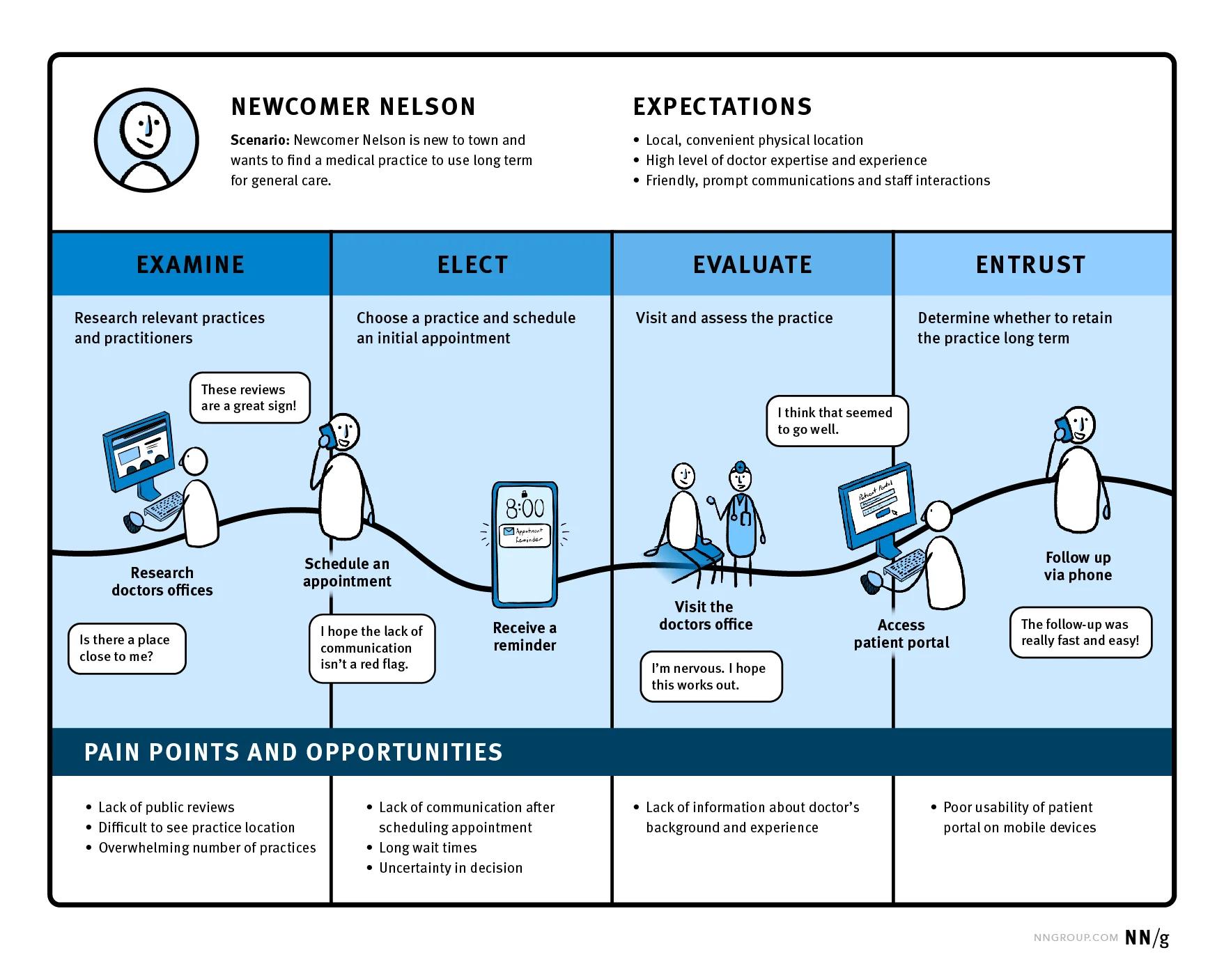
A user journey is a step-by-step map of how someone interacts with a product, service, or brand. It traces their actions, thoughts, and feelings from the moment they first become aware of something, through the process of considering it, using it, and continuing (or stopping) their use. Think of it as walking in their shoes to understand what they actually experience, rather than what you assume they do.
What it involves
- Stages: awareness, research, decision, use, and post-use.
- Touchpoints: places where the person interacts (a website, app, customer support, physical store, etc.).
- Emotions and motivations: what they’re hoping for, what frustrates them, and what keeps them moving forward.
How it helps satisfaction
- Spotting friction: By mapping out the journey, you can see where people get stuck or frustrated. Fixing these issues removes barriers and reduces annoyance.
- Improving flow: It shows where you can make steps smoother, faster, or clearer, which makes the experience feel natural and easy.
- Anticipating needs: You learn what someone is likely to want or worry about at each stage. Meeting those needs proactively creates a sense of being understood.
- Consistency: Seeing the full picture ensures that every interaction—whether online, in-app, or in-person—feels connected, not disjointed.
When done well, a user journey doesn’t just make tasks easier; it makes people feel valued and confident about what they’re doing. That sense of clarity and ease is what leads to higher satisfaction.
Key concepts and terminology
Before you can build a map, you need to understand what you’re mapping. Let’s start by answering what is a user journey map in plain terms and then contrast it with similar terms.
- User journey map vs. customer journey map vs. UX journey map – A user journey map is a diagram that shows how a person interacts with a digital product from start to finish. It captures both sequential actions and emotional highs and lows. A customer journey map covers the broader relationship a person has with your business, including marketing, sales and support. A UX journey map is another way of saying user journey map, but sometimes it is used by designers to emphasise the usability side.
- Persona / actor – The person you’re mapping. Personas should be based on real data, not stereotypes. They remind you that different segments behave differently.
- Touchpoints – Specific moments where someone interacts with your product, service or brand. These could be on your website, in your mobile app, through email or in‑person support. A comprehensive map shows all of them.
- User flow vs. journey phases – A user flow is a detailed sequence of steps for a particular task; it’s about interface states and transitions. User flows reveal friction points and help remove themuserpilot.com. A journey map looks at the bigger picture of how experiences unfold over time.
- Emotional journey / mindset / behaviour – Good maps don’t just show tasks; they capture what people think and feel at each stage. Emotions are indicators of delight or frustration.
- Pain points and opportunities – Moments where the experience breaks down become obvious when you chart them. Those are your improvement opportunities.
- Stakeholder alignment – Mapping the experience brings product, design, marketing and support together around a shared view of reality. It helps them coordinate actions rather than working in silos.
Why startups should care about user journey maps
You might ask, what is a user journey map doing for a small team? Isn’t it overkill? Here’s why it matters.
- See the whole experience, not isolated features – When you visualise the end‑to‑end experience, you stop optimising one screen at a time and start seeing how every step connects. A well‑made map helps teams spot gaps and friction.
- Discover and address pain points early – Research shows that by 2025, 80% of customers value their experience with a company as much as its product. If you ignore friction, you lose trust. Mapping surfaces those moments so you can prioritise fixes.
- Improve consistency across channels – Today people interact through multiple channels. At least three‑quarters of consumers expect consistent interactions across them. Visualising touchpoints helps teams deliver that consistency.
- Unite your stakeholders – When everyone sees the same reality, it’s easier to agree on priorities. Journey maps align product managers, designers and engineers without using spreadsheets.
- Drive measurable outcomes – Better experiences lead to better business results. By 2025, 89% of businesses are expected to compete primarily on customer experience. Companies investing in onboarding and personalised interactions see higher retention and conversions. Mapping gives you a roadmap for those improvements.

In my work with AI‑driven SaaS startups, I’ve seen these benefits first‑hand. One team discovered that their free‑trial sign‑up flow created confusion when users switched devices. Mapping it revealed a missing confirmation email, which we fixed. The change cut trial abandonment by nearly 20%. Another client used maps to coordinate product and support teams, reducing response time and boosting net promoter scores. The tool works because it makes the customer’s reality impossible to ignore.
Components of a strong map
A map is only as good as its parts. Here is a concise overview of the critical pieces and how to approach them. Each entry includes the primary component, its meaning and practical tips.
When you think of what a user journey map is, consider it a blueprint with these parts working together. Without personas, you risk designing for no one. Without emotions, you miss why a feature fails. And without metrics, you can’t prove that changes matter.
How to create a user journey map: a step‑by‑step guide
There are many playbooks out there. The approach below draws from my experience and sources like FullStory, Amplitude and user research best practices. It works for early‑stage products and enterprise software alike.

- Define scope and goal – Be specific. Are you looking at onboarding, renewal, or a support interaction? Choose a scope that matters to your business and is small enough to manage. Avoid mapping everything at once.
- Choose your persona – Identify who you’re mapping. Base this on usage data, support tickets and interviews. Don’t lump different segments into one persona; each map should reflect a distinct group.
- Specify the scenario – State what the person is trying to accomplish. For instance, “I want to go from landing page visitor to trial sign‑up.” Clear scenarios keep your map focused.
- Decide on the current or future state – Are you documenting how things work today or imagining an improved experience? Both are valuable. Current‑state maps help you diagnose issues; future‑state maps support innovation.
- Gather research and data – Use both qualitative and quantitative sources. Interview users to understand their motivations and feelings. Analyse analytics and behaviour data to see where they drop off. Pull support tickets to understand common complaints. This mix grounds your map in reality.
- Break the journey into phases – Use the high‑level stages noted earlier: awareness, consideration, decision, purchase and post‑purchaseamplitude.com. For SaaS onboarding you might use: sign‑up, trial, first session, conversion. Choose stages that reflect real steps.
- List actions, touchpoints and channels for each phase – Document what the user does, sees and uses. A trial user might click “Start trial,” receive an email, install the app, then watch a tutorial. Every step belongs on the map.
- Capture mindset and emotions – Add quotes from interviews or open‑ended survey responses to show what the person thinks and feels. Plot a simple emotional curve across phases to spot peaks and dips. Tools like Amplitude emphasise that emotional context helps teams personalise interactionsamplitude.com.
- Identify pain points – Look for mismatches between expectations and reality. Negative comments, high drop‑off rates and support tickets are all signal problems. Don’t shy away from the ugly moments.
- Chart the sentiment line – Sketch a line that represents emotional highs and lows across phases. It doesn’t have to be precise, but it highlights where people feel stuck or delighted.
- Brainstorm opportunities – List ideas to fix friction or enhance moments of delight. Separate quick wins from long‑term projects. Rank them based on impact and effort. According to OnRamp’s 2024 data, businesses that personalise interactions see 40% higher revenue. Consider how your ideas could contribute to that goal.
- Assign ownership and plan execution – Decide who owns each idea. Without clear owners, improvements won’t happen.
- Measure and iterate – Define success metrics. For example, if you’re improving onboarding, measure trial conversion, time to first value or retention. After implementing changes, revisit the map and validate with users. According to Wyzowl, 86% of customers stay loyal to companies that invest in onboarding. Use metrics to see if your efforts move the needle.
This process may sound involved, but you can start small. Pick a single flow like resetting a password. Map it in an afternoon. You’ll be surprised how many insights surface.
Types of maps and real‑world examples
Once you know what a user journey map is, you’ll see that you can apply the method in different contexts.
Ecommerce example
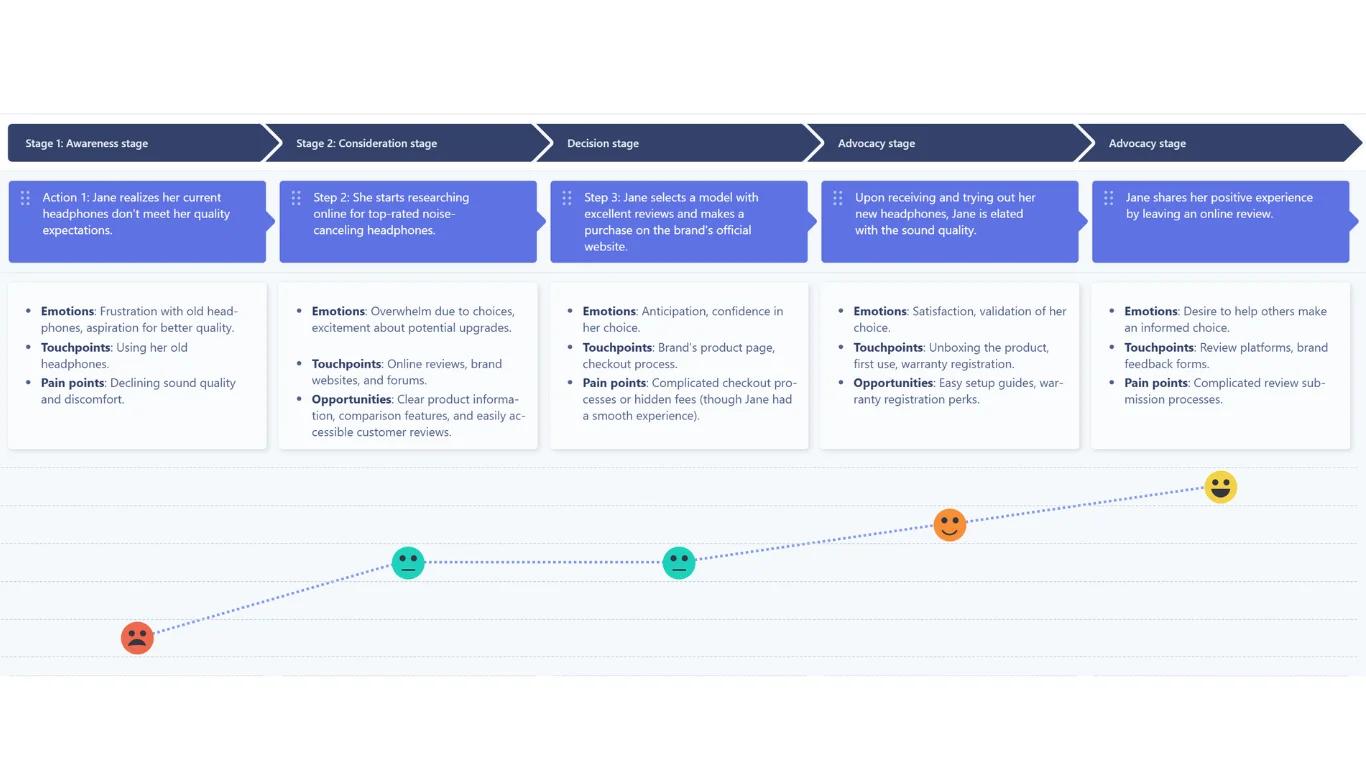
Imagine mapping a headphone purchase from the perspective of a buyer named Jane. UserBit’s article illustrates such an example. Jane moves through phases: realises her old headphones sound bad (awareness), researches noise‑canceling models (consideration), buys a pair online (decision/purchase), enjoys them at home (post‑purchase) and leaves a review (advocacy). At each stage she feels different: frustration with her old gear, excitement when researching options, confidence after purchase. Pain points could include hidden fees at checkout. Opportunities include clearer pricing or easier review submission.
SaaS onboarding
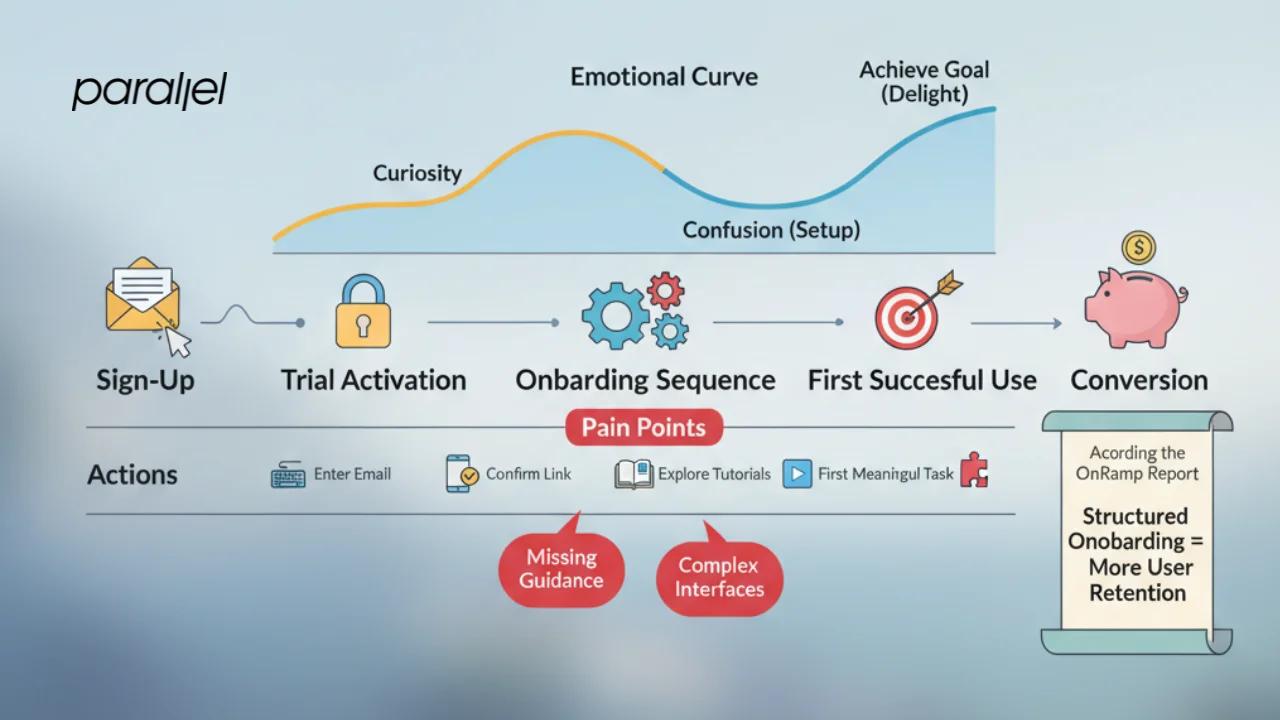
For a SaaS tool, phases might include: sign‑up, trial activation, onboarding sequence, first successful use, conversion. Actions could involve entering an email, confirming through a link, exploring tutorials, and performing the first meaningful task. The emotional curve might start with curiosity, drop to confusion during setup and rise once the user achieves their goal. Pain points often revolve around missing guidance or complex interfaces. According to the OnRamp report, companies that offer structured onboarding retain more users.
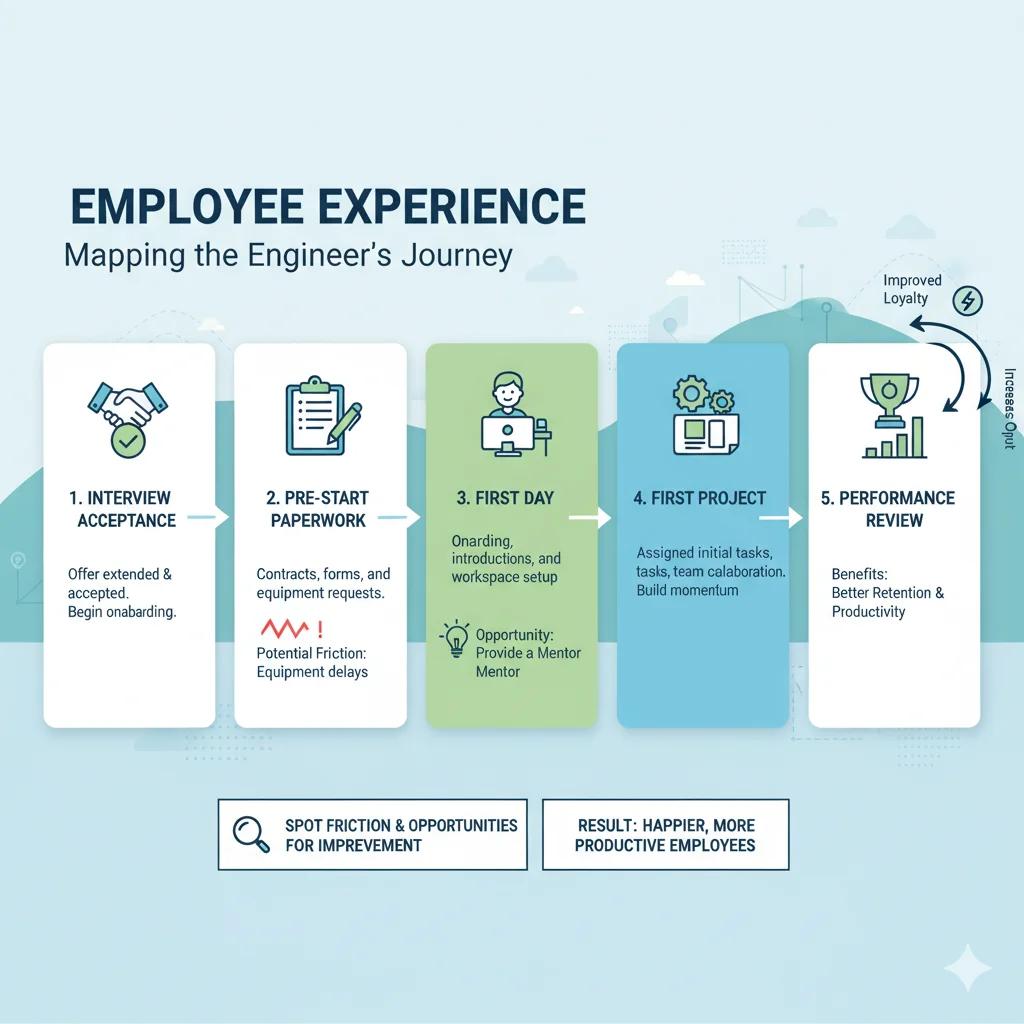
Employee experience
You can apply the same method inside your organisation. Consider mapping how a new engineer gets started. The phases might be: interview acceptance, pre‑start paperwork, first day, first project, performance review. By looking at the internal experience, you spot friction (such as equipment not arriving on time) and opportunities for improvement (like providing a mentor). The benefits mirror those of customer maps – better retention and productivity.
Maps can also differ in complexity. A simple map may chart a single path. A more advanced one may branch based on user decisions. Some teams map current state to identify issues; others use a future state to imagine improvements. You can layer multiple personas to see where needs diverge.
Common mistakes and how to avoid them
Over the years I’ve reviewed many maps. Here are mistakes I see and ways to address them.
- Trying to cover too many personas or scenarios at once – Cramming multiple personas into one map leads to confusion. Pick one persona and one scenario. You can compare maps later.
- Skipping emotional data – If you only list actions, you miss why people behave the way they do. Include emotions and thoughts.
- Ignoring stakeholders – Without involvement from support, marketing and engineering, your map may overlook critical interactions. Involve them early.
- Creating a pretty artefact with no link to metrics – A map is a tool, not art. Connect opportunities to metrics. For example, if you identify a pain point in the sign‑up flow, track conversion after your changes. Amplitude notes that journey maps help find gaps in the experience and create targeted strategiesamplitude.com.
- Not iterating – Experience changes over time. Revisit your map regularly and update it with new data. This ensures it stays useful.
For best results, use real data, keep phases intuitive, make the map easy to read, expose emotional ups and downs, prioritise actionable opportunities and assign owners. Treat the map as a living document that guides ongoing improvements.
Tools, templates and resources
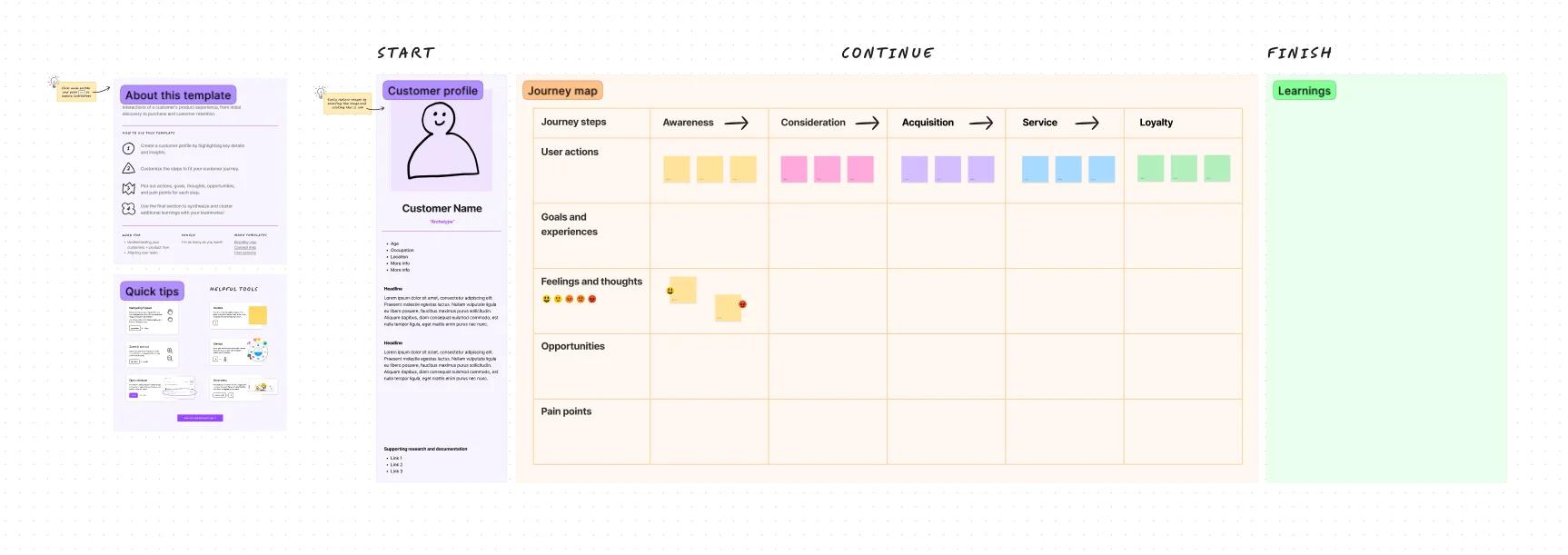
You don’t need specialised software to start mapping; a whiteboard or spreadsheet works. However, collaborative tools can help remote teams. Figma offers community templates for mapping experiences.
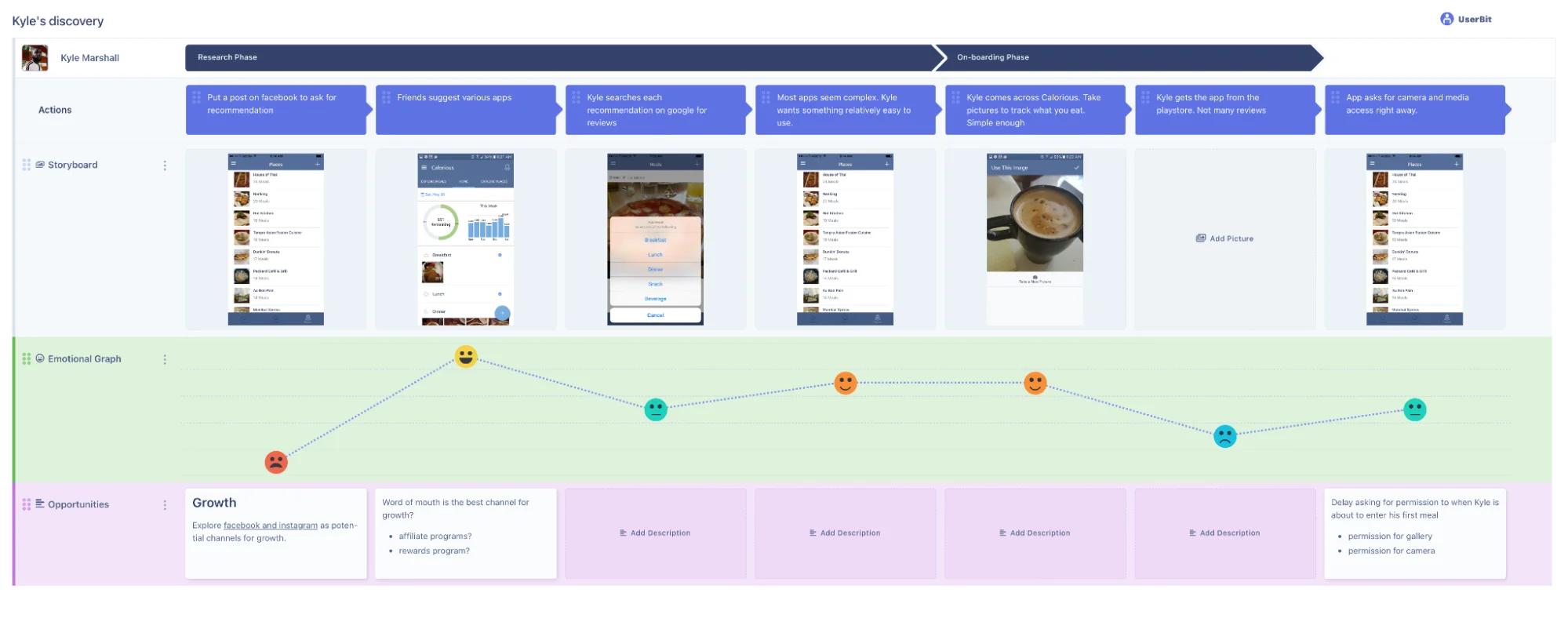
UserBit provides an integrated journey‑mapping tool with persona management and emotional curves.
FullStory and Amplitude include analytics that feed directly into maps. Atlassian’s playbook provides a template and guidance.
Conclusion
Founders and product leaders often ask me, “what is a user journey map, and is it worth the effort?” My answer is always yes, as long as you treat it as a decision‑making tool rather than a decorative poster. A user journey map is a narrative that shows actions, emotions, touchpoints and pain points. It bridges product thinking with real human experiences. It brings teams together around shared insights and drives measurable improvements. As we move into a world where 89% of businesses compete primarily on experience, ignoring the user’s path is no longer an option. Start small: pick one persona, map one scenario, and see what you learn. Then build on it. The path may be messy, but the insights you gain will pay dividends.
Frequently asked questions
1) What does a user journey map do?
A user journey map shows how a person interacts with your product across stages and channels. It captures actions, emotions and pain points, enabling teams to see the experience from the user’s perspective and find areas for improvement. By making hidden friction visible, it helps teams coordinate and improve outcomes.
2) How do you create a user journey map?
Start by defining the scope and persona. Gather qualitative and quantitative research to understand actions and emotions. Break the experience into phases such as awareness, consideration, decision, purchase and post‑purchaseamplitude.com. Document actions, touchpoints and mindset in each phase. Identify pain points, brainstorm improvements, assign ownership and measure outcomes. Then iterate based on feedback and data.
3) Can you give an example of a user journey map?
Yes. In UserBit’s example, Jane’s headphone purchase starts with realising her old headphones aren’t working (awareness) and ends with her leaving a review (advocacy). Each phase lists actions, feelings and pain points. That map helps the product team see where checkout friction or unclear warranties might cause frustration and how to fix them.
4) What are the five stages of a customer journey?
Many maps use five high‑level stages: awareness (discovering a problem or need), consideration (researching options), decision (choosing a product), purchase (completing the transaction) and post‑purchase/support (using the product and seeking help)amplitude.com. Some frameworks add an advocacy stage, where satisfied users share their experience. Choose stages that make sense for your product.
5) How often should you update a journey map?
Treat your map as a living document. Update it whenever you make significant changes to your product or when customer behaviour shifts. Reviewing it quarterly or after major releases ensures it stays relevant and continues to guide improvements.

As the Founder and CEO of Parallel, Robin spearheads a pioneering approach to product design, fusing business, design and AI to craft impactful solutions.